
SMS Messaging
SMS Consent Process
How recipients voluntarily opt in to BidBuyZoom text messages for each auction company
Last updated: October 6, 2026
BidBuyZoom provides optional text-message notifications to bidders who take part in auctions and sales run by auction companies on BidBuyZoom. Consent is collected separately for each auction company. This page documents the opt-in process used by Ablepro, Inc. d/b/a BidBuyZoom.
Who sends the messages?
All messages covered by this program are sent by BidBuyZoom, operated by Ablepro, Inc. d/b/a BidBuyZoom, on behalf of the auction company named in the message. Every message begins with “BidBuyZoom:” and names that auction company.
Messages may concern a recipient’s bidder account, bids, won lots, invoices, payments, security, and customer support with that auction company. Auction companies use BidBuyZoom to run their auctions and sales. BidBuyZoom does not send marketing or promotional messages under this program.
Consent is collected separately for each auction company
A bidder may take part in auctions run by more than one auction company on BidBuyZoom. Consent is collected separately for each auction company. Agreeing to receive text messages about one auction company does not allow BidBuyZoom to send messages about any other auction company. Before sending a message, BidBuyZoom checks that the recipient agreed to messages about that specific auction company at that mobile number. Consent is never reused, shared, or transferred between auction companies.
How recipients opt in
Recipients opt in for a specific auction company in one of the ways below. In every case the consent checkbox names the auction company, is unchecked by default, and must be affirmatively selected by the recipient. Consent is not required to create an account, bid, or buy.
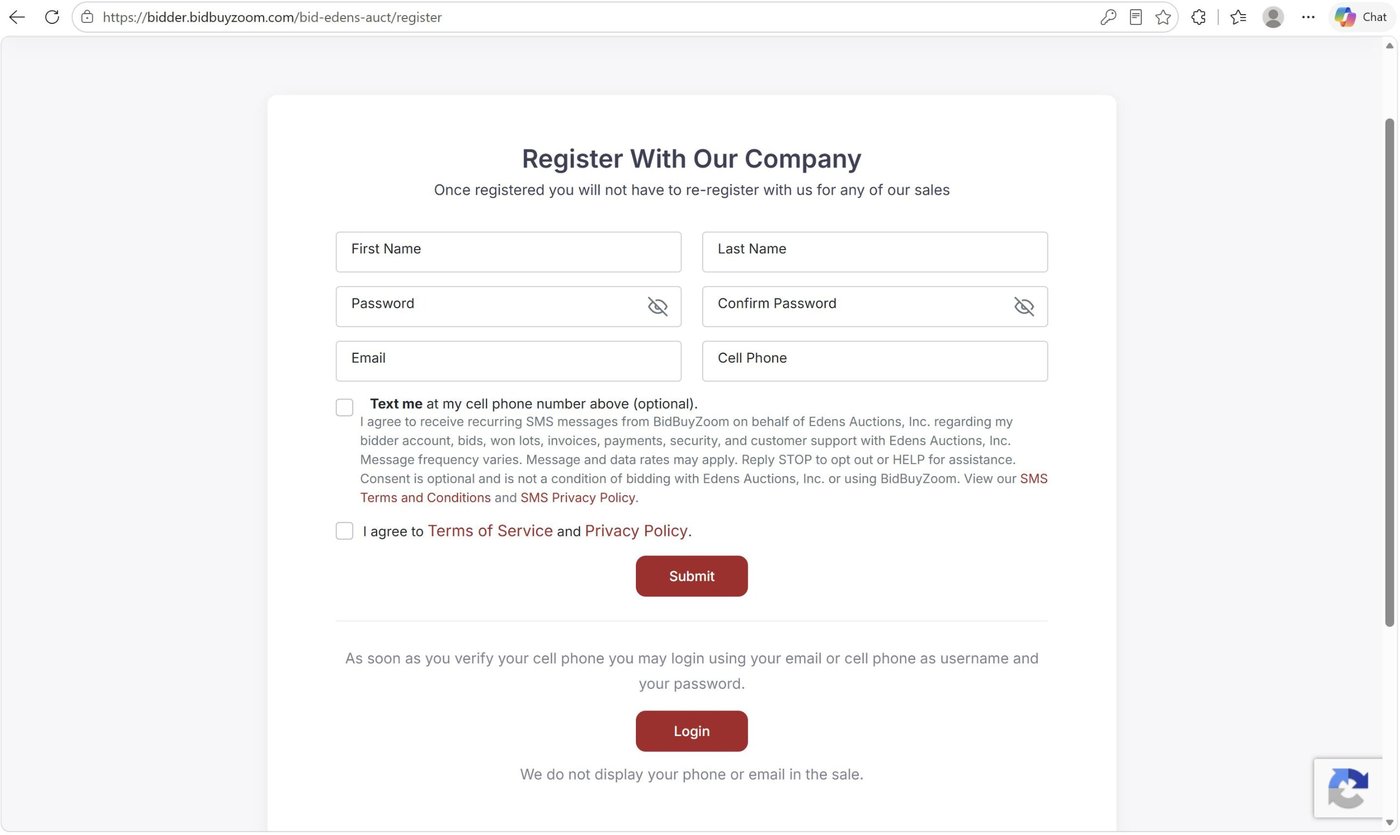
- When creating a bidder account with an auction company. The sign-up form on the auction company’s BidBuyZoom site shows an optional text-message checkbox next to the mobile number field, with consent language naming that auction company. The recipient can create the account without checking it.
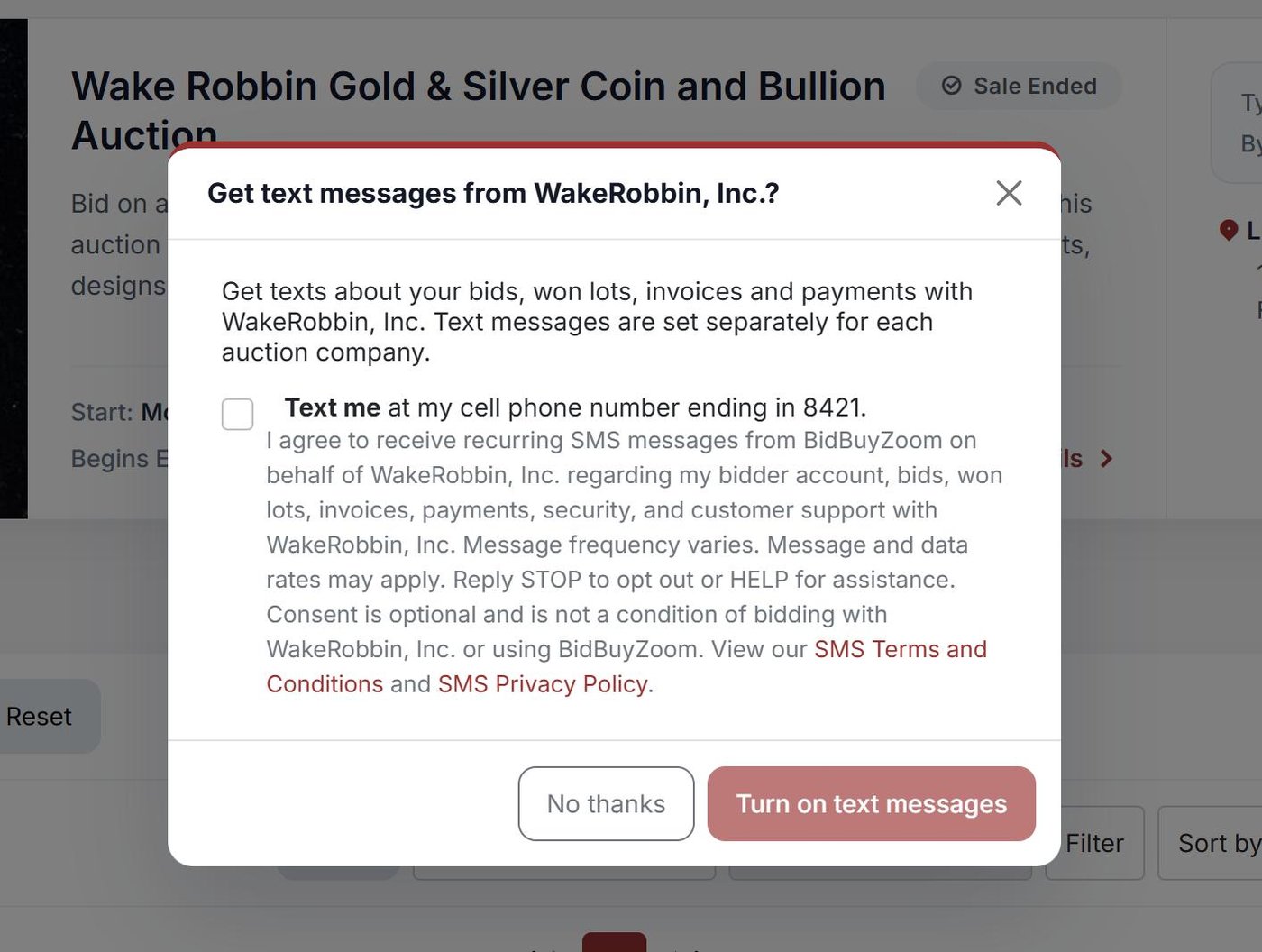
- When first visiting another auction company’s site. A recipient who already has a BidBuyZoom account and signs in on a different auction company’s site is asked once, “Get text messages from [Auction Company Name]?” The question shows the consent language naming that company, an unchecked checkbox, a Turn on text messages button that works only after the box is checked, and a No thanks button. Choosing No thanks is recorded and the question is not shown again for that company.
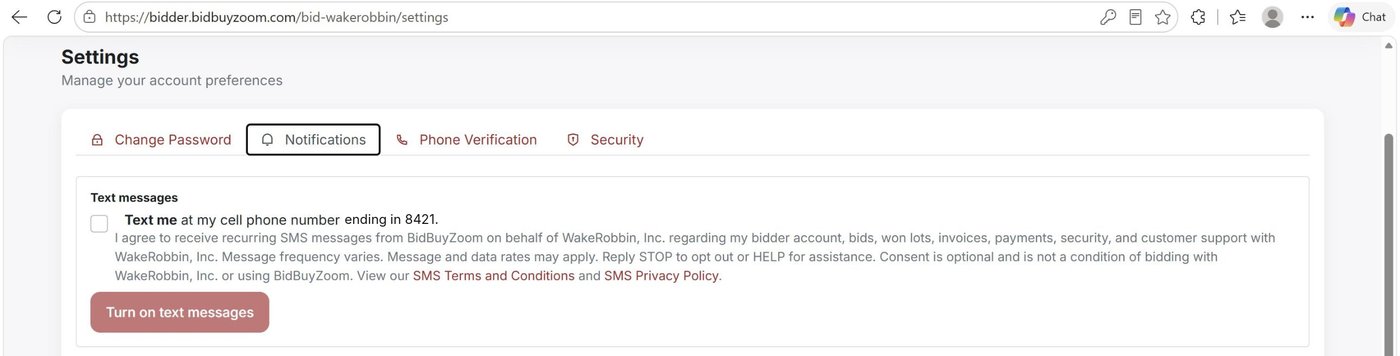
- In account Settings on an auction company’s site. After signing in, the recipient can open Settings, go to the Notifications tab and, under Text messages, select the consent checkbox for that auction company and the mobile number shown, then Turn on text messages. An auction company may email the recipient a link to this screen; the recipient still decides and selects the checkbox themselves.
- Consent given to an auction company’s staff. A recipient may tell an auction company’s staff in person, by phone, or on a signed paper registration form that they want text messages about that company’s auctions. Staff record the consent in BidBuyZoom, including how it was given and who recorded it. The consent covers that auction company only. BidBuyZoom immediately sends a confirmation text naming the auction company and describing the program and how to reply STOP or HELP.
Text messages are sent only to a mobile number the recipient confirmed with a one-time code, or that the recipient gave to auction company staff. Every consent screen links directly to the SMS Terms and Conditions and SMS Privacy Policy.
Consent language shown to recipients
The consent language always names the auction company the recipient is opting in for:
I agree to receive recurring SMS messages from BidBuyZoom on behalf of [Auction Company Name] regarding my bidder account, bids, won lots, invoices, payments, security, and customer support with [Auction Company Name]. Message frequency varies. Message and data rates may apply. Reply STOP to opt out or HELP for assistance. Consent is optional and is not a condition of bidding with [Auction Company Name] or using BidBuyZoom. View our SMS Terms and Conditions and SMS Privacy Policy.
For example, on Edens Auctions, Inc.’s BidBuyZoom site:
I agree to receive recurring SMS messages from BidBuyZoom on behalf of Edens Auctions, Inc. regarding my bidder account, bids, won lots, invoices, payments, security, and customer support with Edens Auctions, Inc. Message frequency varies. Message and data rates may apply. Reply STOP to opt out or HELP for assistance. Consent is optional and is not a condition of bidding with Edens Auctions, Inc. or using BidBuyZoom. View our SMS Terms and Conditions and SMS Privacy Policy.
Sample messages
- BidBuyZoom: You're signed up for text messages about your bids and purchases with Edens Auctions, Inc. Msg frequency varies. Msg & data rates may apply. Reply HELP for help, STOP to opt out.
- BidBuyZoom: You've been outbid on "1878 Morgan Silver Dollar" in Fall Coin Auction (Edens Auctions, Inc.). New high bid: $35. Place a higher bid now. Reply STOP to opt out.
- BidBuyZoom: Your invoice for "Fall Coin Auction" from Edens Auctions, Inc. is ready. Total: $54.90. Check your email for details. Reply STOP to opt out.
Opt-in screens
The screenshots below show the optional consent checkbox on the bidder sign-up form, in the one-time question shown on another auction company’s site, and in account Settings. Each names the auction company, the checkbox is not selected by default, and the recipient may continue without opting in.
Consent records
When a recipient opts in, BidBuyZoom records information necessary to document the opt-in, including the auction company the consent is for, the mobile number and account identifier, the date and time of consent, the source of the opt-in, the version of the consent language presented, and, for consent recorded by auction company staff, how it was given and who recorded it. BidBuyZoom also records opt-out requests and “No thanks” answers so they are honored.
Opting out and obtaining help
Recipients may opt out at any time by replying STOP. Because all messages in this program come from the same BidBuyZoom number, replying STOP stops messages about every auction company. After opting out, a recipient may receive one confirmation message and will receive no additional messages under this program unless they opt in again. A recipient may also turn off messages about one auction company only, in Settings on that company’s site.
Recipients may reply HELP for assistance, use our contact form, or email support@bidbuyzoom.com.
Program policies
Mobile telephone numbers, SMS opt-in data, and SMS consent will not be sold, rented, transferred, or shared with third parties or affiliates for their marketing or promotional purposes.
Program operator
Ablepro, Inc. d/b/a BidBuyZoom
Messaging brand: BidBuyZoom